
Full-floor coverage
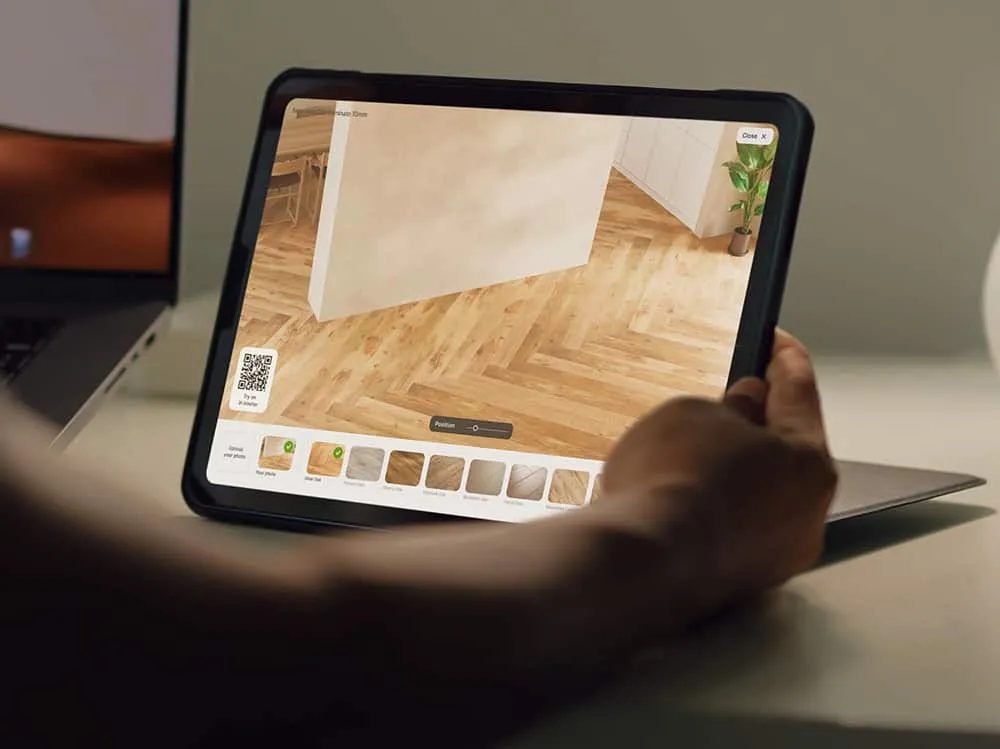
Apply the selected finish across the visible floor area to preview the room as a whole.
Flooring visualizer
A sample can show a finish. It cannot show the rhythm of a pattern across a room. Vizbl helps retailers have that larger conversation online and in the showroom.
Capabilities
Apply the selected finish across the visible floor area to preview the room as a whole.
Let shoppers compare materials in an uploaded image of the room they are updating.
Explore finishes in sample rooms before uploading a personal room photo.
Open a flooring preview in the actual space on a supported mobile device.
Use real plank, tile and pattern dimensions to show their scale, alignment and perspective.
Prepare wood, laminate, vinyl, tile, stone and carpet previews from seamless textures.
Send textures and dimensions to Vizbl. The team prepares and loads your flooring variants.
Give each flooring product a room-preview button linked to the correct material.
Send seamless textures and product dimensions. Vizbl prepares your catalog for preset interiors, uploaded room photos and phone AR, with no separate 3D model for each flooring SKU.
Plan your implementationSelect representative wood, stone or tile products and provide their texture imagery and details.
The Vizbl team loads your flooring variants. Confirm asset requirements and catalog mapping together.
Integrate the visualizer and connect the appropriate product destinations.
Check the visual presentation, supported devices and path to samples or inquiries.
Common questions
Vizbl currently prepares the catalog for you. Send seamless textures, product dimensions and references so the team can load your variants.
Use it to evaluate appearance and build a shortlist. Confirm physical color, finish, suitability, quantities and installation requirements through your normal specification process.
Yes. Add the Vizbl script and product-specific buttons to your existing storefront. Each button opens the corresponding flooring material.
No. Flooring previews use seamless textures and real material dimensions. Customers can compare the prepared finishes in preset rooms, their own room photo or phone AR.
Your collection. Your next step.
Bring the material collection you want to launch. We will review the catalog preparation and demonstrate the flooring experience.
Let’s talk about your catalogA conversation with the Vizbl team.